
Operator Library: Hardware Platform
このオペレーターは、25 Gbit/s ファイバーレーンで動作する CXP over Fiber (CoF) カメラと VisualApplets との間の画像データインターフェイスを表します。このオペレーターは、クワッドチャネル CoF 構成(つまり 100 Gbit/s)で使用できます。インターフェイスのトポロジは FiberConnection パラメーターによって選択され、これによりオペレーターを QSFP28 ポート [0] または QSFP28 ポート [1] のいずれかに接続できます。オペレーターは、カメラが配信するフォーマットに関係なく、未処理の画像データを出力します。その後、この画像データをカメラが送信するフォーマットに変換する必要があります。画像データを変換するには、生バイト値をピクセル値に集約してキャストするための適切なオペレーターを使用します。動作中の特定の状況は、以下に説明するようにイベントシステムを介して通知される場合があります。さらに、オペレーターには、カメラとの接続のステータスを示すさまざまなパラメータがあります。
| Available for Hardware Platform |
|---|
| imaFlex 2 Dual 100 |
VisualAppletsでのインスタンス化
オペレーターは出力 O に画像データを提供します。この出力は常時存在します。この標準出力ポートに加えて、CXPヘッダーのメタデータ用のオプションの MetaDataO 出力を設定できます。オペレーターのインスタンス化時に、次のポップアップダイアログが表示されます。
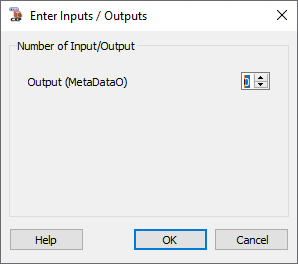
ここで、オプションのメタデータポートを指定できます。ポートの可用性を「0」(デフォルト)に設定した場合、ポートはオペレーター内に存在しません。ポートの可用性を1に設定すると、オペレーターインターフェースでメタデータポートを利用できるようになります。
オプションの MetaDataO ポート
MetaDataO は 10x1 カーネルリンクとして構成されており、10 個の 24-bit コンポーネントで構成されています。出力のフォーマットを次の図に示します。

各 CXP フレームには、対応する画像ヘッダーが用意されています。圧縮された画像ヘッダーは 10 個の異なる値で構成されます。値は 8 ~ 24-bit です。オペレーターはこれら 10 個の値をカーネル値 (10x1) パッド付きとして提供し、各コンポーネントは 24-bit にパッドされます。
| Image Header Field | Kernel Index | Bit Width [bit] | 説明 |
|---|---|---|---|
| StreamId | 0 | 8 | CXPストリームのID |
| Tag | 1 | 16 | ソース画像インデックス。インデックスは転送された画像ごとにインクリメントされ、0xFFFF で 0 にラップアラウンドします。同じ画像に関するデータを含む各ストリームには、同じ番号を使用する必要があります(マルチタップストリームの場合)。 |
| XSize | 2 | 24 | この値は、ピクセル単位での画像幅を表します。 |
| XOff | 3 | 24 | この値は、デバイスの完全な画像の左端のピクセルに対する、画像の水平方向のオフセットをピクセル単位で表します。 |
| YSize | 4 | 24 | この値は、ピクセル単位での画像高さを表します。ラインスキャン画像の場合、この値は 0 に設定されます。 |
| YOff | 5 | 24 | この値は、デバイスの完全な画像のトップラインに対する、画像の垂直方向のオフセットをピクセル単位で表します。ラインスキャン画像の場合、この値は 0 に設定されます。 |
| DSizeL | 6 | 24 | この値は、画像ラインあたりの 32-bit データワードの数を表します。 |
| PixelF | 7 | 16 | この値は Pixel Format を表します。 |
| TapG | 8 | 16 | この値はタップジオメトリを表します。 |
| Flags | 9 | 8 | イメージフラグです。 |
デバイスリソースの使用状況
オペレーターは、パラメータ FiberConnection の選択に応じて、Port[0] CoF Lane の 4 つのリソース、または Port[1] CoF Lane の 4 つのリソースのいずれかを使用します。リソースは、ポート [0] またはポート [1] のいずれかにある、QSFP28 コネクタ内の物理ファイバーレーンを表します。割り当てられたレーンは、CoF プロトコル専用に使用されます。異なるオペレーターを使用する異なるプロトコル(データ転送)でも QSFP28 コネクタを使用できます。ただし、プロトコルの選択は QSFP28 ポート全体(つまり、その内部の 4 つのレーンすべて)に対して行われます。プロトコルは、AppletProperties オペレーターの FiberProtocol0 および FiberProtocol1 パラメーターで定義します。イベントシステムには、EventPort 型の設定可能なリソースが使用されます。また、読み取り専用リソース EventID が割り当てられ、これはランタイムソフトウェアによるイベントチャネルの識別と登録に使用されます。
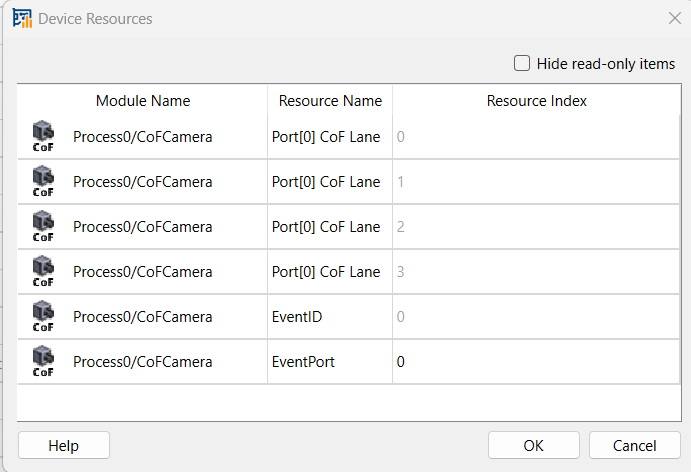
Port[n] は QSFP28[n] コネクタを表します。リソースインデックスは、選択されたコネクタ内のファイバーレーンです。
![[注]](../common/images/admon/note.png) |
Resources Are Read-Only |
|---|---|
|
EventPort を除くすべてのリソースは読み取り専用です。その値は、ポート(コネクタ)およびレーン(コネクタ内のファイバー接続)にマップされた FiberConnection パラメーターの値を反映します。 |
![[重要]](../common/images/admon/important.png) |
画像幅および画像高さの変更 |
|---|---|
|
出力リンクの最大画像幅と高さプロパティを使用することで、カメラ固有の設定に合わせて幅と高さを調整できます。ただし、オペレータポートOの最大画像幅は、ポートOの並列度で割り切れる必要があります。したがって、最大画像幅がポートOの並列度で割り切れることを確認してください。 |
エラーハンドリングとイベントシステム
受信した再構築フレームが、CXP 画像ヘッダーでカメラによって通知されたものよりも大きいか小さいことをオペレーターが検出すると、対応するエラーカウンターパラメータのいずれかがインクリメントされます。
-
受信したフレームの寸法が画像ヘッダーで指定されたものよりも小さい場合、FrameCorruptedCount がインクリメントされます。
-
受信したフレームの寸法が画像ヘッダーで指定されたものよりも大きい場合、FrameOversizedCount がインクリメントされます。
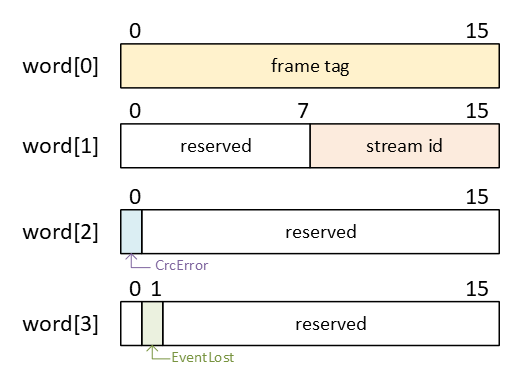
For a set of very critical errors, the operator will forward asynchronous events to the host runtime software (Framegrabber SDK). Events can be caused by corrupted frames or CRC errors. The event name in the Framegrabber API is <hierarchical operator name>\CxpStreamStatus, e.g. Device1\Process0\Camera\CxpStreamStatus. The event payload is provided as four 16-bit data words. The event format is defined as follows:
-
word [0]:
-
Bits [0:15]: イベントが発生した CXP 画像タグ。
-
-
word [1]:
-
Bits [0:7]: 予約されており、定義された機能はありません。その値は無視してかまいません。
-
Bits [8:15]: イベントが発生したストリーム ID。
-
-
word [2]:
-
Bit [0]: CRC エラーが発生しました。
-
Bits [1:15]: 予約されており、定義された機能はありません。その値は無視して構いません。
-
-
word [3]:
-
Bit [0]: 予約されており、定義された機能はありません。その値は無視して構いません。
-
Bit [1]: イベントロスが発生しました。これは、先行するイベントが失われたことを意味します。これは、ランタイムソフトウェアがイベントに応答せず、内部イベントキューがオーバーフローしたときに発生します。
-
Bit [2:15]: 予約されており、定義された機能はありません。その値は無視して構いません。
-
各エラーイベントは、ランタイムソフトウェアでの割り込みをトリガーします。割り込みの数を減らすために、同じフレームタグを持つ複数のイベントがマージされる場合があります。イベントがマージされると、それらのエラーフラグが結合されます。
イベントが失われた場合、その直前のイベントには失われたイベントに関する情報が含まれます。この先行イベントは、同じフレームタグを共有する以降のイベントとマージすることはできません。
CRCエラーによって引き起こされたイベントにはフレームタグが含まれますが、このタグが必ずしもCRCエラーが発生した正確なフレームに対応しているとは限りません。場合によっては、タグが先行フレームまたは後続フレームを指していることがあります。
この状況は、カメラが2つ以上のフレーム間の遷移にまたがるCXPパケットを送信するときに発生する可能性があります。ストリームデータがその場で再構築されている間、CRCの計算はパケットの終了時に完了します。その結果、オペレータによって先行フレームがすでに送信された後にCRCエラーが検出される場合があります。
カメラパケットに1つのフレームの終わりと次のフレームの初めの両方が含まれていない通常の条件下では、CRCエラー時に報告されるフレームタグは常に正しくなります。
その他の場合において、完全なフレームストリームデータが最大パケットサイズよりも小さい場合、単一のパケット内で1つのフレームが重複することがあります。そのような場合、ソフトウェアアプリケーションは、先行フレーム(フレームタグ - 1)および後続フレーム(フレームタグ + 1)についても同様に破損している可能性があるものとして扱う必要があります。
| Link Parameter | Output Link O | 出力リンク MetaDataO |
|---|---|---|
| Bit Width | 8 | 24 |
| Arithmetic | unsigned | unsigned |
| Parallelism | 48 | 1 |
| Kernel Columns | 1 | 10 |
| Kernel Rows | 1 | 1 |
| Img Protocol | {VALT_IMAGE2D, VALT_LINE1D} (default: VALT_IMAGE2D) | {VALT_IMAGE2D, VALT_LINE1D, VALT_PIXEL0D} (default: VALT_IMAGE2D) |
| Color Format | VAF_GRAY | VAF_GRAY |
| Color Flavor | FL_NONE | FL_NONE |
| Max. Img Width | any(デフォルト:1056) | 1 |
| Max. Img Height | any(デフォルト:1056) | 1 |
| FiberConnection | |
|---|---|
| タイプ | 静的書き込みパラメータ |
| Default | port_0_lane_0_1_2_3 |
| 範囲 | {port_0_lane_0_1_2_3, port_1_lane_0_1_2_3} |
|
パラメータ FiberConnection は、カメラがどのQSFP28ポートに接続されているか、およびカメラオペレータがそのポートのどのレーンを使用しているかを定義します。 現在、ポート0およびポート1では、4レーンを持つカメラ構成のみがサポートされています。選択されたQSFP28 portは、そのポートの AppletProperties オペレータ内の FiberProtocol パラメータが DataForwarding ではなく CoF に設定されている場合にのみ使用できます。 FiberProtocol パラメータが DataForwarding に設定されており、かつ CoFCamera オペレータがそのファイバーポートへのマッピングを試みた場合、デザインルールチェック(DRC)によってエラーメッセージが生成されます。この場合、FiberConnection パラメータには競合を示すマーク(赤色)が付けられ、カーソルを合わせると競合を説明するクイックチップヘルプメッセージが表示されます。 同じハードウェアQSFP28ポートの同じレーンを使用できる CoFCamera オペレータは1つだけです。複数のオペレータ間のマッピングは、デザイン全体で一意である必要があります。 |
|
| MaxPacketSize | |
|---|---|
| タイプ | 静的書き込みパラメータ |
| Default | _16384 |
| 範囲 | {_16384, _8192} |
|
パラメータ MaxPacketSize は、CXP規格で指定されているように、接続されたカメラの最大ストリームパケットサイズをバイト単位で定義します。カメラは、この制限以下のストリームパケットを送信します。 このパラメータは、Block RAMのFPGAリソースの使用量に影響します。値が小さいほど、使用されるBlock RAMリソースは少なくなります。例(4レーン):値 _16384 は64個のBlock RAMリソースを使用し、値 _8192 は32個のBlock RAMリソースを使用します。 |
|
| InjectError | |
|---|---|
| タイプ | 動的書き込みパラメータ |
| Default | PacketTagError |
| 範囲 | {PacketTagError, ImageTagError, CorrectedError, PacketBufferOverflow, CrcError, FrameCorrupted, FrameOversized, UnexpectedStartupData} |
|
パラメータ InjectError は、テスト目的でエラーを注入するために使用されます。エラーを注入すると、対応するエラーカウントパラメータがインクリメントされます。 エラーの種類によっては、注入によってソフトウェア割り込みイベントが発生することもあります。エラーのセマンティクスに関する詳細については、関連するパラメータの説明を参照してください。 |
|
| UsedConnections | |
|---|---|
| タイプ | 動的読み取りパラメータ |
| Default | 4 |
| 範囲 | [1 : 4] |
|
このパラメータは現在使用されていません。 将来の機能のために含まれています。 |
|
| PacketTagErrorCount | |
|---|---|
| タイプ | 動的読み取りパラメータ |
| Default | 0 |
| 範囲 | [0 : 4095] |
|
パラメータ PacketTagErrorCountは、CXP規格に従った期待されるタグに準拠していないタグを持つ受信パケットの数をカウントします。この値は、後続のストリームパケットタグの列挙にギャップが観測された状況をカウントします。これは12ビットのCounterです。
オーバーフロービットが設定されている場合、Counter値は不定値として扱われます。つまり、2047回を超えるエラー状況が発生したことを意味します。 |
|
| ImageTagErrorCount | |
|---|---|
| タイプ | 動的読み取りパラメータ |
| Default | 0 |
| 範囲 | [0 : 4095] |
|
このパラメータは、画像ヘッダータグ、CXP規格に従った期待されるタグ、および受信したタグの間で、いくつの不一致が発生したかをカウントします。これは12ビットのCounterです。
オーバーフロービットが設定されている場合、Counter値は無効であり無視する必要があります。つまり、2047回を超えるエラー状況が発生したことを意味します。 |
|
| CorrectedErrorCount | |
|---|---|
| タイプ | 動的読み取りパラメータ |
| Default | 0 |
| 範囲 | [0 : 4095] |
|
このパラメータは、画像ヘッダーまたはラインマーカーで検出され、正常に修正されたエラーの数を示します。これは12ビットのCounterです。
オーバーフロービットが設定されている場合、Counter値は無効であり無視する必要があります。つまり、2047回を超えるエラー状況が発生したことを意味します。 |
|
| PacketBufferOverflowCount | |
|---|---|
| タイプ | 動的読み取りパラメータ |
| Default | 0 |
| 範囲 | [0 : 4095] |
|
このパラメータは、チャネルボンディングパケットバッファにおけるオーバーフロー状況を監視します。オーバーフローは、CXPプロトコルにより複数のファイバーレーンを使用する構成でのみ発生する可能性があります。これは12ビットのCounterです。
オーバーフロービットが設定されている場合、Counter値は無効であり無視する必要があります。つまり、2047回を超えるエラー状況が発生したことを意味します。 |
|
| PacketBufferOverflowSource | |
|---|---|
| タイプ | 動的読み取りパラメータ |
| Default | 0 |
| 範囲 | [0x0 : 0xF] |
|
このパラメータは、4つのCXPチャネル(すなわちファイバーレーン)のどれでパケットバッファのオーバーフローが発生したかを照会するためのビットマスクを実装します。順序:
|
|
| CameraScanMode | |
|---|---|
| タイプ | 動的読み取りパラメータ |
| Default | エリア |
| 範囲 | {area, line} |
|
受信した画像ヘッダーは、ストリームがエリアスキャンアプリケーション用かラインスキャンアプリケーション用かを示します。このパラメータは、直近で受信したストリーム画像ヘッダー情報を示します。 |
|
| UnexpectedStartupDataCount | |
|---|---|
| タイプ | 動的読み取りパラメータ |
| Default | 0 |
| 範囲 | [0 : 4095] |
|
このパラメータは、オペレーターのリセット後の最初のデータ値が、事前に画像ヘッダーを受信していないために予期しないものとなっているエラー状態を検知します。処理開始時の予期しないバイト数を報告します。これは12ビットのCounterです。
オーバーフロービットが設定されている場合、Counter値は無効であり無視する必要があります。つまり、2047回を超えるエラー状況が発生したことを意味します。 予期しないスタートアップデータは、カメラ、フレームグラバーファームウェアの実装におけるエラー、または検出手順の不適切なソフトウェア制御が原因で発生する可能性があります。カメラ、ファイバーモジュール、またはファイバーケーブルのハードウェアの欠陥も、このような状況を引き起こす可能性があります。 |
|
| FrameCorruptedCount | |
|---|---|
| タイプ | 動的読み取りパラメータ |
| Default | 0 |
| 範囲 | [0 : 4095] |
|
このパラメータは、アクリジション中の破損したフレームをカウントします。破損したフレームには、VisualAppletsパイプラインに送信された誤ったピクセルが含まれています。これは12ビットのCounterです。
オーバーフロービットが設定されている場合、Counter値は無効であり無視する必要があります。つまり、2047回を超えるエラー状況が発生したことを意味します。 |
|
| FrameOversizedCount | |
|---|---|
| タイプ | 動的読み取りパラメータ |
| Default | 0 |
| 範囲 | [0 : 4095] |
|
このパラメータは、アクリジション中に検出されたサイズオーバーのフレーム数をカウントします。サイズオーバーのフレームとは、画像ヘッダーで指定された数よりも多くのラインまたはピクセルを含むフレームのことです。このようなエラーは、ハードウェアの欠陥に起因する伝送の問題や、カメラのファームウェアのバグによって発生する可能性があります。これは12ビットのCounterです。
オーバーフロービットが設定されている場合、Counter値は無効であり無視する必要があります。つまり、2047回を超えるエラー状況が発生したことを意味します。 |
|
| CrcErrorCount | |
|---|---|
| タイプ | 動的読み取りパラメータ |
| Default | 0 |
| 範囲 | [0 : 4095] |
|
このパラメータは、CXPストリームパケットにおけるCRCエラーの発生回数をカウントします。12ビットのCounterです。
オーバーフロービットが設定されている場合、Counter値は無効であり無視する必要があります。つまり、2047回を超えるエラー状況が発生したことを意味します。 |
|
 前へ
前へ

